
Georgia VINELink Custody Coverage
Georgia VINE is the statewide Appriss victim-notification service. The Criminal Justice Coordinating Council announced its statewide launch in 2024. Users can reach it by phone, web, and mobile app, with multilingual support and notices around the clock. Official guidance lets a person search the county where someone was arrested, held, or tried, review an available custody result, and register a phone or email for alerts.
One caution applies. A launch date does not mean every county feed turned on at once. Georgia lists no Catoosa-specific SAVIN brand. Select Georgia, search Catoosa County, and take any missing or unclear result to the jail. VINE is a custody and safety tool, not a booking-photo gallery or a full arrest archive.
VINE's real value is notice. It works after a custody record has already matched your person. Alerts can cut down repeated manual checks. Still, they supplement a safety plan rather than replace direct agency contact. The Catoosa Sheriff's Office stays the authority on jail status, while Georgia DOC holds state correctional records. The proper court decides the case outcome.
Begin at the official Georgia VINELink interface. It runs private name or ID searches.

The blank statewide start page from Georgia VINELink appears here. It shows no private custody record or contact information.
Check a Catoosa Arrest
Have the full name and any solid identifier ready first. Match only the fields on the official screen when several results appear. A shared name is not proof you found your person.
- Open Georgia VINELink. Use the official state page rather than a third-party custody directory.
- Choose the person search. Search by name or the identification number available to you. Interface labels can change.
- Select Catoosa County when prompted. Official guidance points users to the county where the person was arrested, held, or tried.
- Review the returned status and date. Look for an identifying number, location, and custody wording. Compare dates before choosing among similar names.
- Open only the correct record. If identity remains uncertain, stop and contact the jail rather than merging details from several people.
- Save the result details. Note the search time, status, and ID. That record helps explain a later change or failed match.
VINELink stops at custody basics. It leaves out the full booking record and any court result. The Catoosa County recent arrests hub covers the jail roster, records request, and court path.
Catoosa VINELink Result Fields
Exact fields depend on the live service and the agency supplying data. Treat the screen as the source on the day you search. The fields below are useful categories. Catoosa records may not carry every one.
| Result item | How to read it |
|---|---|
| Name or offender ID | An identity check. Use more than a name when possible. |
| Custody status | The status available to VINE at that time, which may lag an agency event. |
| Facility or agency | The reported place or authority associated with custody, not the arresting officer's full report. |
| Status or event date | A timestamp for the displayed information. It is not always the arrest or booking date. |
| Release or transfer event | A custody change that may support an alert, subject to the system's feed and timing. |
| Registration option | The route to request notice. Registering does not alter custody or create a booking record. |
The Catoosa sheriff roster shows current local jail custody. A VINE result adds alerts. A court docket carries the disposition, the final outcome of a case. Read all three together only after identity is confirmed.
Dates need special care. An event date may mark when VINE received or displayed a custody change. A booking date belongs to jail intake. An arrest date belongs to the alleged event. They can differ. Write the label down along with the number, since that habit makes later checks with Records much easier.
Register Catoosa Custody Alerts
Register only after the correct person turns up. The Georgia Benchbook allows a phone or email. The live service may offer other channels or rename its buttons, so follow the current prompts and save the confirmation.
- Confirm the record first. Match the name, identifier, county, status, and date before attaching an alert.
- Choose notification or registration. Select the option tied to that custody record.
- Select a contact channel. Enter a phone number or email address that you control. Keep personal contact data off public devices.
- Create the requested PIN or security response. Store it safely. It may be needed to manage or confirm a notification.
- Review the event choices. Select the available release, transfer, or other custody-change notices that fit the safety need.
- Save and test the confirmation. Record the registration time and follow any verification message sent by the system.
Treat any notice as a prompt to check official status, especially when safety rides on it. Delivery can fail. Feed timing, changed contact details, spam filters, carrier problems, or an agency event the system has not yet shown can all delay a message.
Skip shared public devices for registration. That can create a safety risk. Sign out when finished. Keep the PIN or security response private. Update the registration in the live system whenever a phone number or email changes. A screenshot shared with an advocate or attorney should leave out the contact data.
Confirm Catoosa VINELink Results
A blank result can mean several things in Catoosa County. Intake paperwork may still be moving. The name or county selection may not match. The person could have been released, transferred, or held somewhere VINE does not reach. Treat an empty result as a gap, not as proof that no arrest occurred. Do not assume release yet.
Try spelling variations only when they belong to the person you know. Use an official ID number if you have one. Broadening the search too far has a cost. It pulls in unrelated people who are not the match you want. If Catoosa is missing from the county list, note that. If the service errors out, write down the time and contact VINE support through its live interface. Then try the sheriff roster and Records line. A technical glitch says nothing about who is in custody.
VINELink is not the only route. Check Catoosa County Arrests Last 24 Hours for the live roster path. It also explains same-day limits. The Sheriff's Office answers at 706-935-2424, and the Records Division publishes catoosarecords@catoosacountyga.gov. For a formal booking document, use Catoosa GovQA and pick Sheriff's Office Records. Is the VINELink result missing or unclear? The official Catoosa current-inmate portal is the direct local comparison.
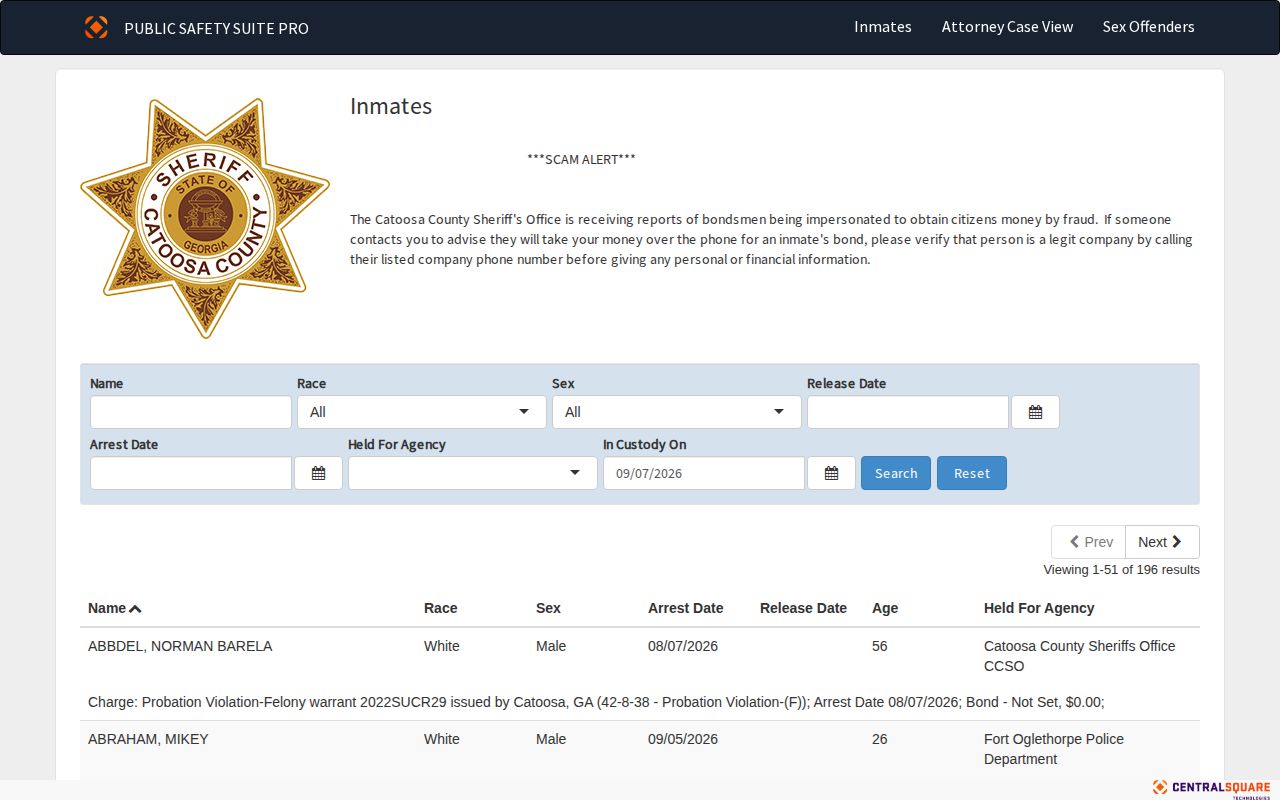
The local roster shows who is in custody right now. A fresh booking may not have posted yet, so check again before drawing conclusions about recent arrests.
Custody Systems VINE Does Not Replace
The sheriff's Inmate Related page links the official Zuercher roster along with separate services for inmate phone, mail, commissary, messaging, property, and visitation. Those vendors are not arrest feeds. The sheriff lists no booking app of its own. VINE's mobile app is just another door into the statewide notification service, not a source of Catoosa County recent arrests.
Federal custody needs a federal source. The Federal Bureau of Prisons locator covers people in BOP records from 1982 onward. The ICE Online Detainee Locator handles certain people in current or recent immigration custody. Neither one shows Catoosa booking photos. Someone sentenced into the Georgia Department of Corrections belongs in the state's offender query, not the county current-inmate roster.
A transfer moves the search to a different system. A person can leave the county jail for state custody, federal custody, another county, or release, and the local roster alone will not say which. Do not guess which. Read the VINE notice closely. Then confirm the receiving agency or release status with that named authority. If the message gives no clear destination, the Sheriff's Office or Records Division is the right first local contact.
Note: Local jail, state prison, federal prison, and immigration custody are separate states with different official search tools.
Catoosa Arrests and Court Outcomes
VINELink reports custody events, nothing more. Release can follow bond, a court order, sentence completion, transfer, or some other event. None of that settles the case itself.
For outcomes, turn to the Lookout Mountain Judicial Circuit and the proper Catoosa or municipal court. The sheriff says the jail does not set court dates. Match the person to a case number, date, and court whenever possible. An alert is not a court finding.
Catoosa first appearance normally happens by video conference on weekdays. Other timing rests with the magistrate. Bonds and conditions may be set at that stage. Custody can change after booking as a result. VINELink still does not replace the court calendar or explain a judicial decision. Contact the right court or the prosecutor for case dates and disposition.